Feature · Tomorrow check
Catch tomorrow’s problems while there is still time to fix them.
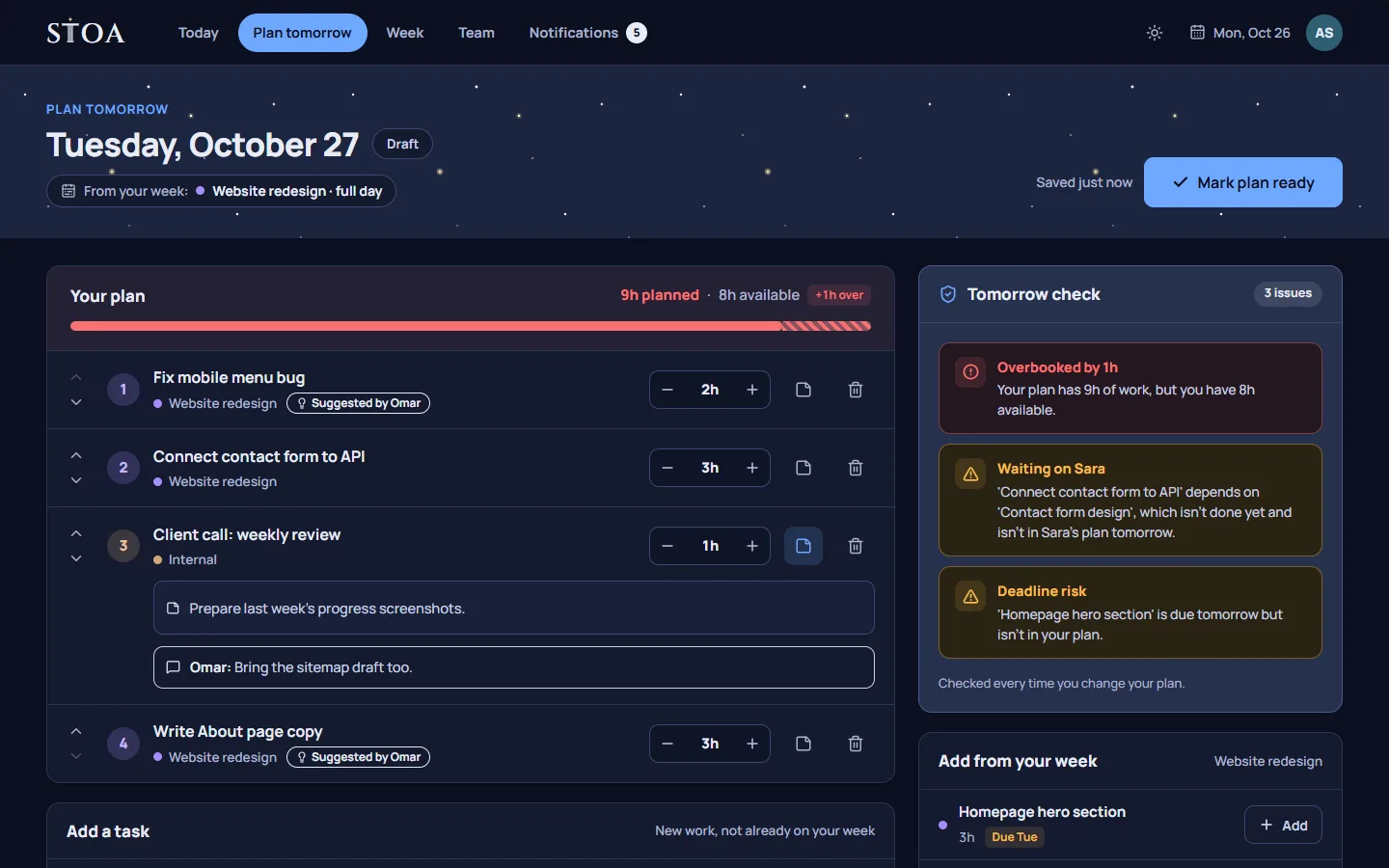
The tomorrow check reads each person’s plan for the next day and points out what will not work: too many hours, work waiting on someone else, a blocked task, a deadline at risk. You see it in the evening, not at 10 AM.
Why check tomorrow tonight
Most planning problems are visible the evening before. Someone has nine hours of tasks in an eight-hour day. A review is planned for a design that will not be ready until the afternoon. A task is due on Wednesday, and nobody has put it on a day yet. None of this is hard to spot, but it is easy to miss when each person plans alone and the team only compares notes at the morning stand-up.
By then the day has started. People have opened their inbox, the client has called, and changing the plan means interrupting someone who is already working on something else. The tomorrow check moves that conversation to the quiet end of the previous day, when a two-minute change is still cheap.
What the check looks for
The check runs on the plan each person is making for the next working day. It flags:
- An overbooked day. The planned hours are longer than that person’s working day, as set in your team’s Settings.
- Work waiting on someone else. A task depends on another task that is not done yet and is not in its owner’s plan for tomorrow.
- A blocked task. A task depends on work that a colleague is still doing tomorrow, so it may not be ready to start.
- A deadline at risk. A task is due tomorrow or later this week and is not in the plan yet.
- A task that may be stuck. A task has been moved three times, which usually means something is in its way.
- Someone with no plan. A team member has not planned tomorrow yet, so a leader knows who to nudge before people leave.
- A time-off clash. You planned a task with a colleague who is off tomorrow.
Each item names the task and the person, so the fix is usually obvious: move one task to Wednesday, ask a colleague to start their part earlier, or drop something that no longer matters.
Where it fits in the evening
Stoa prompts each person to plan the next day after a time your team chooses, for example 4 PM. Their day starts pre-filled from the week board and from any tasks their manager suggested. They put the list in order, adjust the hours, and the check updates as they go. When the list is clean, they save the plan and leave.
Leaders see the same warnings on the team’s plans for tomorrow. A manager with six people can read the whole team’s next day in a couple of minutes and fix the one handoff that would have stalled.
It suggests, it does not decide
The check never moves anything on its own. A warning is information, not a rule. Some days a person knowingly plans a long day, or starts a task that is technically waiting on someone because they can do the first half alone. They can keep the plan as it is. The point is that the choice is made on purpose, the night before.
What happens at the end of the day
The check works best together with the end-of-day review. When someone finishes their day, Stoa asks what happened to anything left open. Each unfinished task can move to tomorrow, go back to the week, be dropped, or be recorded as overtime. A task that keeps sliding is flagged after its third move, because it usually needs a conversation rather than another move.
That review feeds straight into the next plan. The tasks carried over appear on tomorrow’s list, the check runs again, and the loop closes before anyone goes home.
What the check is not
It is not a time tracker. Stoa does not run timers, take screenshots, or watch activity. Hours come from the plan a person confirmed, nothing else. It is also not a scoring system: nobody is ranked by how many warnings they had. It exists so that tomorrow starts with a plan that holds.
If you want to see how the check works with real tasks, the guide to planning tomorrow for your team walks through a full evening, and the pricing page lists what each plan includes. Every plan has the tomorrow check.
Plan tomorrow tonight, starting this week.
14 days free, no card needed. One price covers the whole team, from 2 to 30 people.