For software teams
Daily planning for small software teams, without another stand-up.
Your issue tracker knows what needs doing. Stoa answers what each developer will do tomorrow, whether it fits in the day, and which handoffs are going to stall, the evening before.
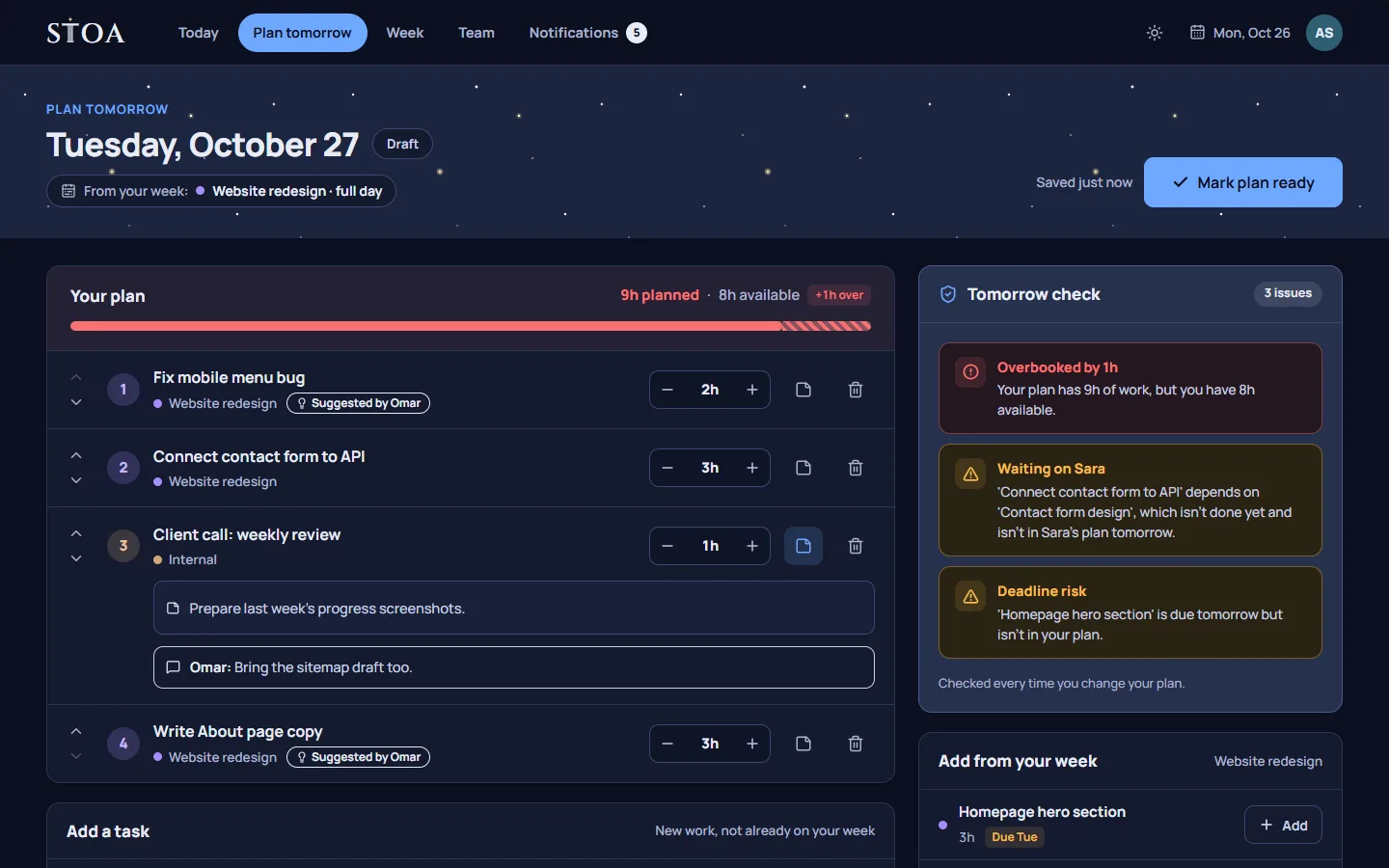
The gap between the backlog and the day
Small software teams usually have a good backlog. Tickets are written, priorities are set, and the sprint board is up to date. What is often missing is the next step: which of those tickets each person will actually work on tomorrow, in what order, and whether the pieces depend on each other.
The morning stand-up tries to fill that gap, but it happens after the day has started. By the time someone says “I am blocked on the API change”, the person who could unblock them has already started something else.
Plan tomorrow in the last ten minutes
With Stoa, each developer spends a few minutes at the end of the day planning tomorrow. They pick the tasks, put them in order, and estimate hours. The plan starts from the week, so if they are on the payments project tomorrow the plan already says so. The tomorrow check then reads the whole team’s plans together and flags:
- a task that depends on work that is not done yet and is not in its owner’s plan for tomorrow;
- a task that depends on work a teammate is still doing tomorrow;
- a task due soon that is not planned;
- a day with more hours than the working day;
- a task that has been moved three times and may be stuck.
These are exactly the problems a stand-up is meant to catch. Catching them the evening before means the fix is a short message, not a reshuffled morning.
Reviews and handoffs that line up
Code review is the classic handoff that stalls. Someone finishes a change at 4 PM and the reviewer’s next day is already full. In Stoa, the review can be a task in the reviewer’s plan, and the dependency is visible: if the work is not planned in time, the check says so. A lead can see the team’s plans for tomorrow on one screen and suggest a task to the right person, with a note.
No timers, no surveillance
Developers rarely enjoy time tracking, and Stoa does not do it. There are no timers, screenshots, or activity tracking. Hours come from the plan a person confirms at the end of the day. When a day runs long, the extra hours are recorded as overtime and acknowledged by their lead, so a crunch week is visible instead of silent.
How it sits next to your issue tracker
Stoa is not an issue tracker and does not try to replace one. It has no sprints, story points, or Git integration. Teams typically keep tickets where they are and use Stoa for the daily layer: who works on what tomorrow, and whether that plan holds. If you want to bring a list of tasks in, you can import a CSV file.
Because notifications stay inside Stoa and Stoa sends no email, it does not add to the noise developers already get. Updates are grouped into “Needs attention” and “For your information”, and you can filter them.
Fits a small team’s schedule
Remote teams often span time zones and non-standard weeks. You set your team’s work days and hours in Settings, and every plan and check follows them. A team that works Sunday to Thursday, or starts at 7 AM, plans exactly the same way.
Try it on a real week
The quickest way to judge Stoa is to plan one real week with it. Every plan starts with a 14-day free trial, and you do not need a card to start. Pricing is per team, from 2 to 30 people; see the pricing page for the plans.
Plan tomorrow tonight, starting this week.
14 days free, no card needed. One price covers the whole team, from 2 to 30 people.